Developer Guide
Table of Contents
- Introduction
- Acknowledgements
- Setting up, getting started
- Design
- Implementation
- Documentation, logging, testing, configuration, dev-ops
- Appendix: Requirements
- Appendix: Instructions for manual testing
Introduction
Purpose
The purpose of the developer guide is to document a brief overview of the multi-level design architecture of HustleBook. This allows you to gain a better understanding on the various components that makes HustleBook and how each component work with one another.
Who is this for?
The target audience for this Developer Guide is any user who is interested in understanding the internal logic and design architecture of HustleBook. What can you do with this information?
- Support HustleBook as a developer - develop new features or enhance existing features to support the needs of our product users. You can send a PR of your contribution to our GitHub repo
- Tweak features to suit your needs - any current users who can modify our codes to tweak certain features to fit their needs. E.g: You need another attribute to track in the client list.
What is HustleBook?
HustleBook (HB) is a desktop app specially catered towards financial advisors for managing client details and meetings, optimized for use via a Command Line Interface (CLI) while still having the benefits of a Graphical User Interface (GUI). If you can type fast, HB can get your client management meetings done faster than traditional GUI apps. Feel free to read the User Guide to know more about what HustleBook can do for you!
Acknowledgements
- {list here sources of all reused/adapted ideas, code, documentation, and third-party libraries – include links to the original source as well}
- HustleBook is a brown-field project from an existing project called AddressBook3 where enhancements were made to solve the issues that Financial Advisors face. ——————————————————————————————————————–
Setting up, getting started
Refer to the guide Setting up and getting started.
Design
 Tip: The
 .puml files used to create diagrams in this document can be found in the diagrams folder. Refer to the PlantUML Tutorial at se-edu/guides to learn how to create and edit diagrams.
Architecture
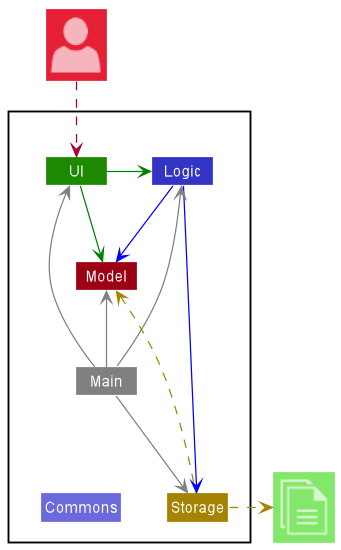
The Architecture Diagram given above explains the high-level design of the App.
Given below is a quick overview of main components and how they interact with each other.
Main components of the architecture
Main has two classes called Main and MainApp. It is responsible for,
- At app launch: Initializes the components in the correct sequence, and connects them up with each other.
- At shut down: Shuts down the components and invokes cleanup methods where necessary.
Commons represents a collection of classes used by multiple other components.
The rest of the App consists of four components.
-
UI: The UI of the App. -
Logic: The command executor. -
Model: Holds the data of the App in memory. -
Storage: Reads data from, and writes data to, the hard disk.
How the architecture components interact with each other
The Sequence Diagram below shows how the components interact with each other for the scenario where the user issues the command delete John.
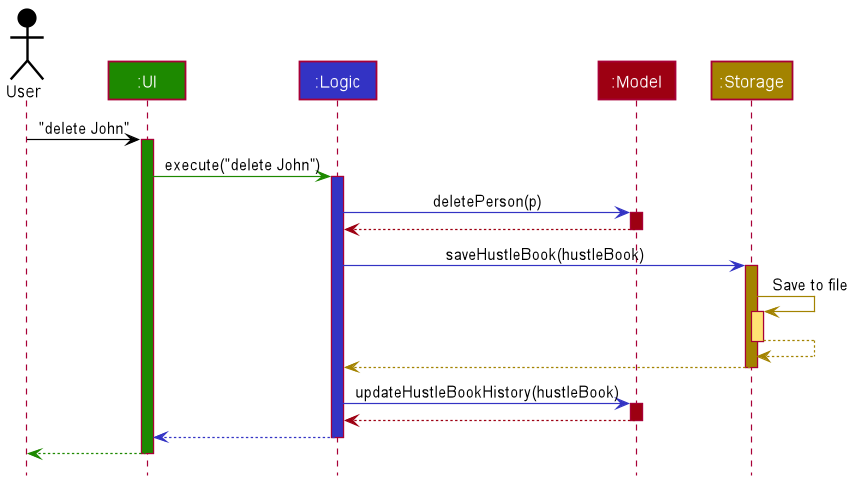
Each of the four main components (also shown in the diagram above),
- defines its API in an
interfacewith the same name as the Component. - implements its functionality using a concrete
{Component Name}Managerclass (which follows the corresponding APIinterfacementioned in the previous point.
For example, the Logic component defines its API in the Logic.java interface and implements its functionality using the LogicManager.java class which follows the Logic interface. Other components interact with a given component through its interface rather than the concrete class (reason: to prevent outside component’s being coupled to the implementation of a component), as illustrated in the (partial) class diagram below.
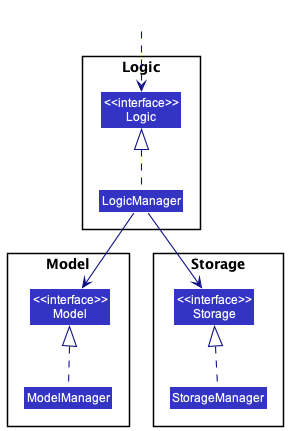
The sections below give more details of each component.
UI component
The API of this component is specified in Ui.java
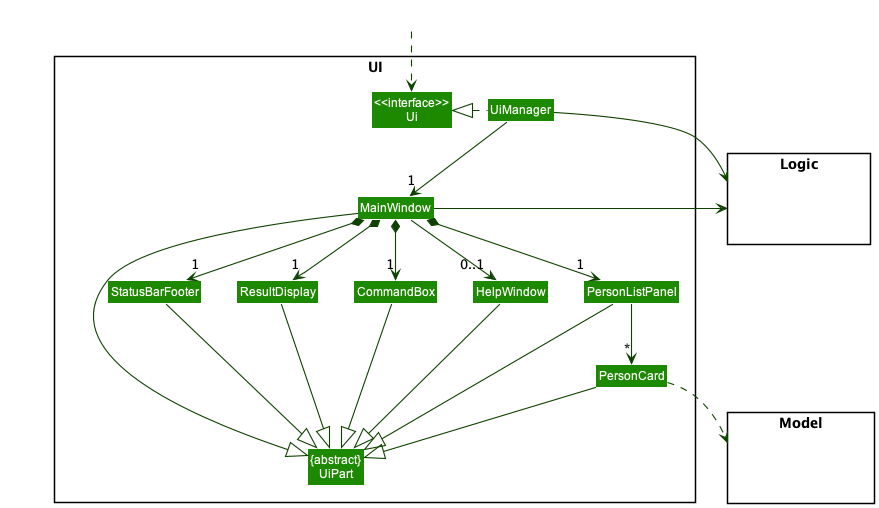
The UI consists of a MainWindow that is made up of parts e.g.CommandBox, ResultDisplay, PersonListPanel, StatusBarFooter etc. All these, including the MainWindow, inherit from the abstract UiPart class which captures the commonalities between classes that represent parts of the visible GUI.
The UI component uses the JavaFx UI framework. The layout of these UI parts are defined in matching .fxml files that are in the src/main/resources/view folder. For example, the layout of the MainWindow is specified in MainWindow.fxml
The UI component,
- executes user commands using the
Logiccomponent. - listens for changes to
Modeldata so that the UI can be updated with the modified data. - keeps a reference to the
Logiccomponent, because theUIrelies on theLogicto execute commands. - depends on some classes in the
Modelcomponent, as it displaysPersonobject residing in theModel.
Logic component
API : Logic.java
Here’s a (partial) class diagram of the Logic component:
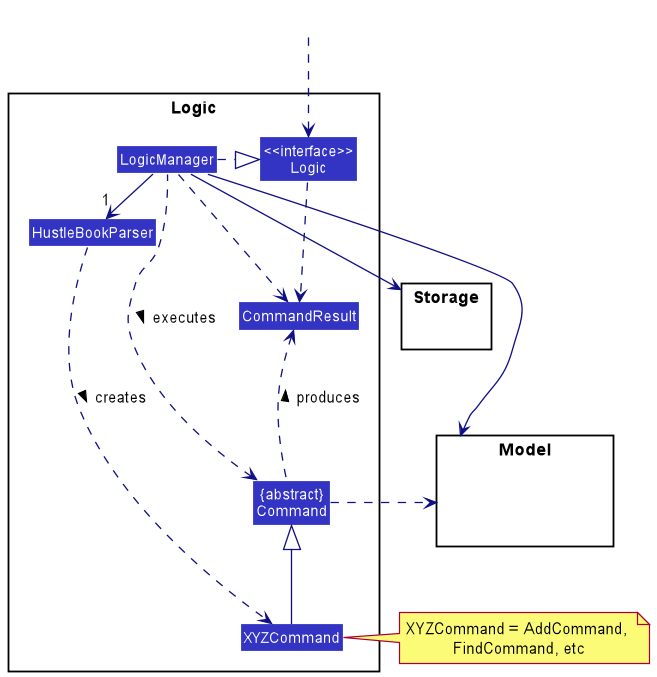
How the Logic component works:
- When
Logicis called upon to execute a command, it uses theHustleBookParserclass to parse the user command. - This results in a
Commandobject (more precisely, an object of one of its subclasses e.g.,AddCommand) which is executed by theLogicManager. - The command can communicate with the
Modelwhen it is executed (e.g. to add a person). - The result of the command execution is encapsulated as a
CommandResultobject which is returned back fromLogic.
The Sequence Diagram below illustrates the interactions within the Logic component for the execute("delete John") API call.
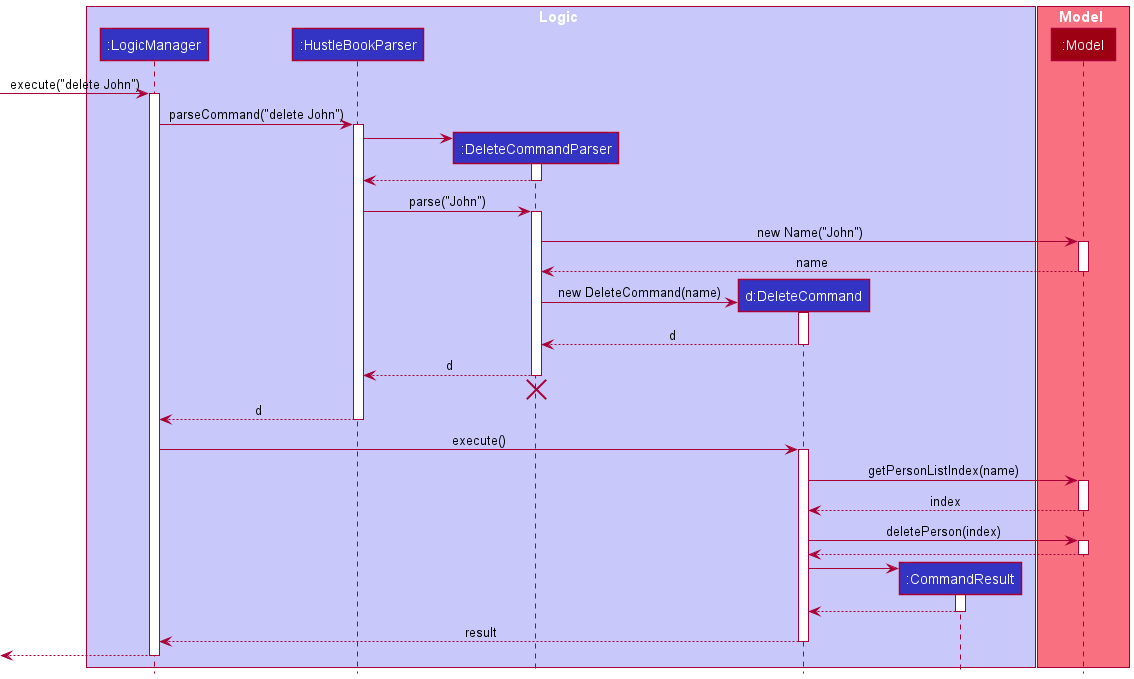
 Note: The lifeline for
 DeleteCommandParser should end at the destroy marker (X) but due to a limitation of PlantUML, the lifeline reaches the end of diagram.
Here are the other classes in Logic (omitted from the class diagram above) that are used for parsing a user command:
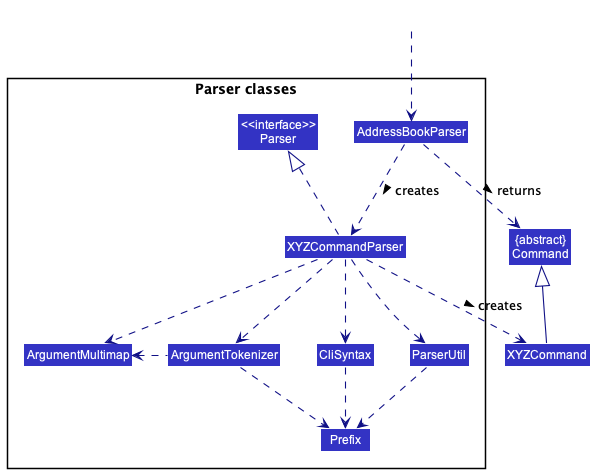
How the parsing works:
- When called upon to parse a user command, the
HustleBookParserclass creates anXYZCommandParser(XYZis a placeholder for the specific command name e.g.,AddCommandParser) which uses the other classes shown above to parse the user command and create aXYZCommandobject (e.g.,AddCommand) which theHustleBookParserreturns back as aCommandobject. - All
XYZCommandParserclasses (e.g.,AddCommandParser,DeleteCommandParser, …) inherit from theParserinterface so that they can be treated similarly where possible e.g, during testing.
Model component
API : Model.java
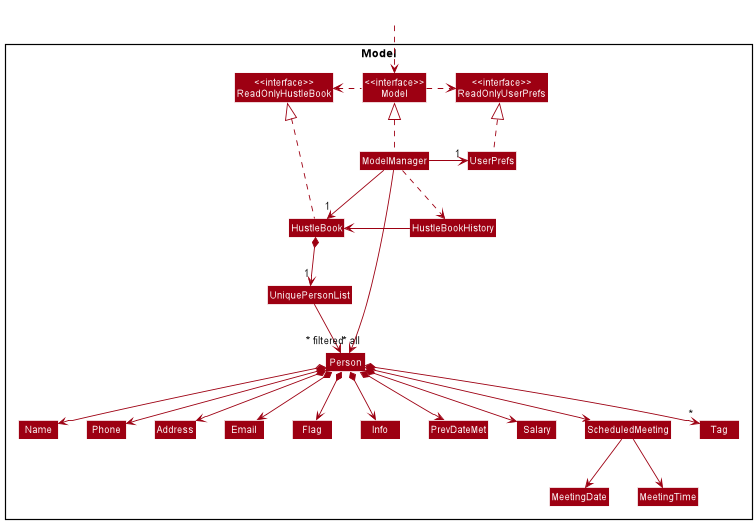
The Model component,
- stores the address book data i.e., all
Personobjects (which are contained in aUniquePersonListobject). - stores the currently ‘selected’
Personobjects (e.g., results of a search query) as a separate filtered list which is exposed to outsiders as an unmodifiableObservableList<Person>that can be ‘observed’ e.g. the UI can be bound to this list so that the UI automatically updates when the data in the list change. - stores a
UserPrefobject that represents the user’s preferences. This is exposed to the outside as aReadOnlyUserPrefobjects. - does not depend on any of the other three components (as the
Modelrepresents data entities of the domain, they should make sense on their own without depending on other components)
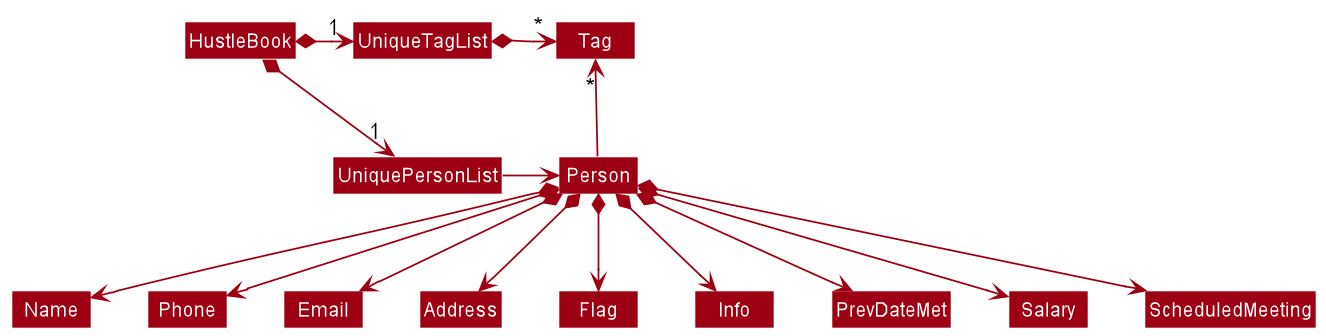
Note: An alternative (arguably, a more OOP) model is given below. It has a Tag list in the AddressBook, which Person references. This allows AddressBook to only require one Tag object per unique tag, instead of each Person needing their own Tag objects.❗️ IMAGE NEEDS TO BE UPDATED (Remove caution if image is sufficient)
Storage component
API : Storage.java
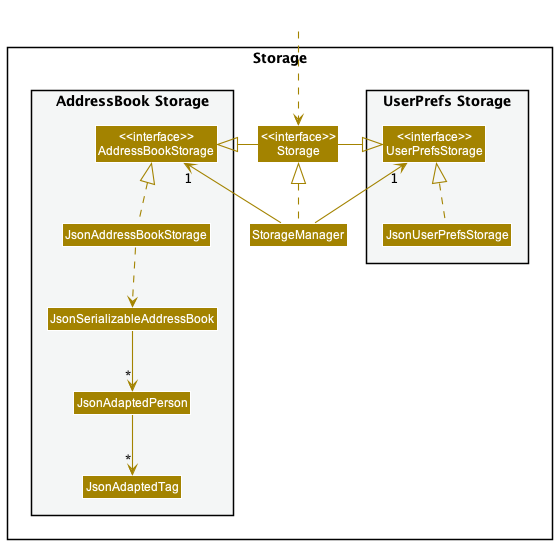
The Storage component,
- can save both address book data and user preference data in json format, and read them back into corresponding objects.
- inherits from both
HustleBookStorageandUserPrefStorage, which means it can be treated as either one (if only the functionality of only one is needed). - depends on some classes in the
Modelcomponent (because theStoragecomponent’s job is to save/retrieve objects that belong to theModel)
Common classes
Classes used by multiple components are in the seedu.address.commons package.
Implementation
This section describes some noteworthy details on how certain features are implemented.
Managing Meetings
Financial Advisors often need to schedule and reschedule meetings with their clients. On top of that, the meetings
are often cancelled upon. Considering these issues, the implementation of managing meeting need to be quick and easy.
Therefore, a meet command was introduced. Along with prefixes of d/ and t/ for date and time of the meeting and
a prefix c/ to cancel the meeting.
Furthermore, we decided to implement scheduling the meeting by name to make our application user-friendly, especially for non-technical users. As an enhancement, we also ensured that the meeting does not clash with the existing meetings scheduled.
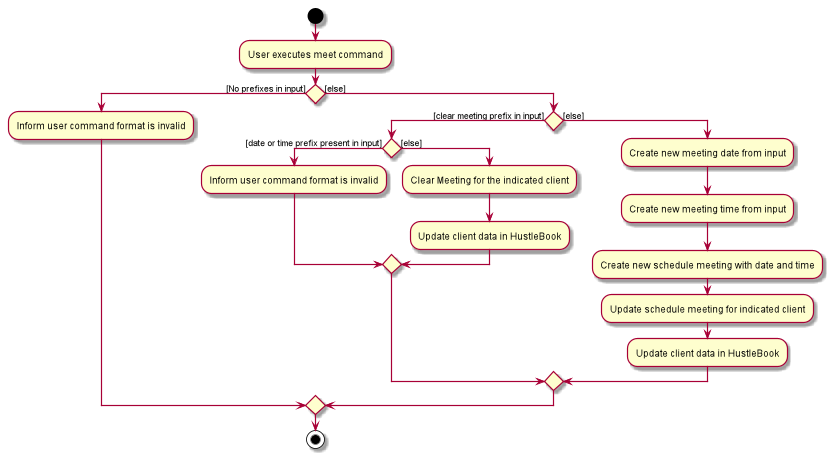
The following activity diagram describes how the meet command determine if it should schedule or cancel the meeting
with a client in the list. It ensures that either the prefixes d/ and t/ or only c/ prefix is given as input.
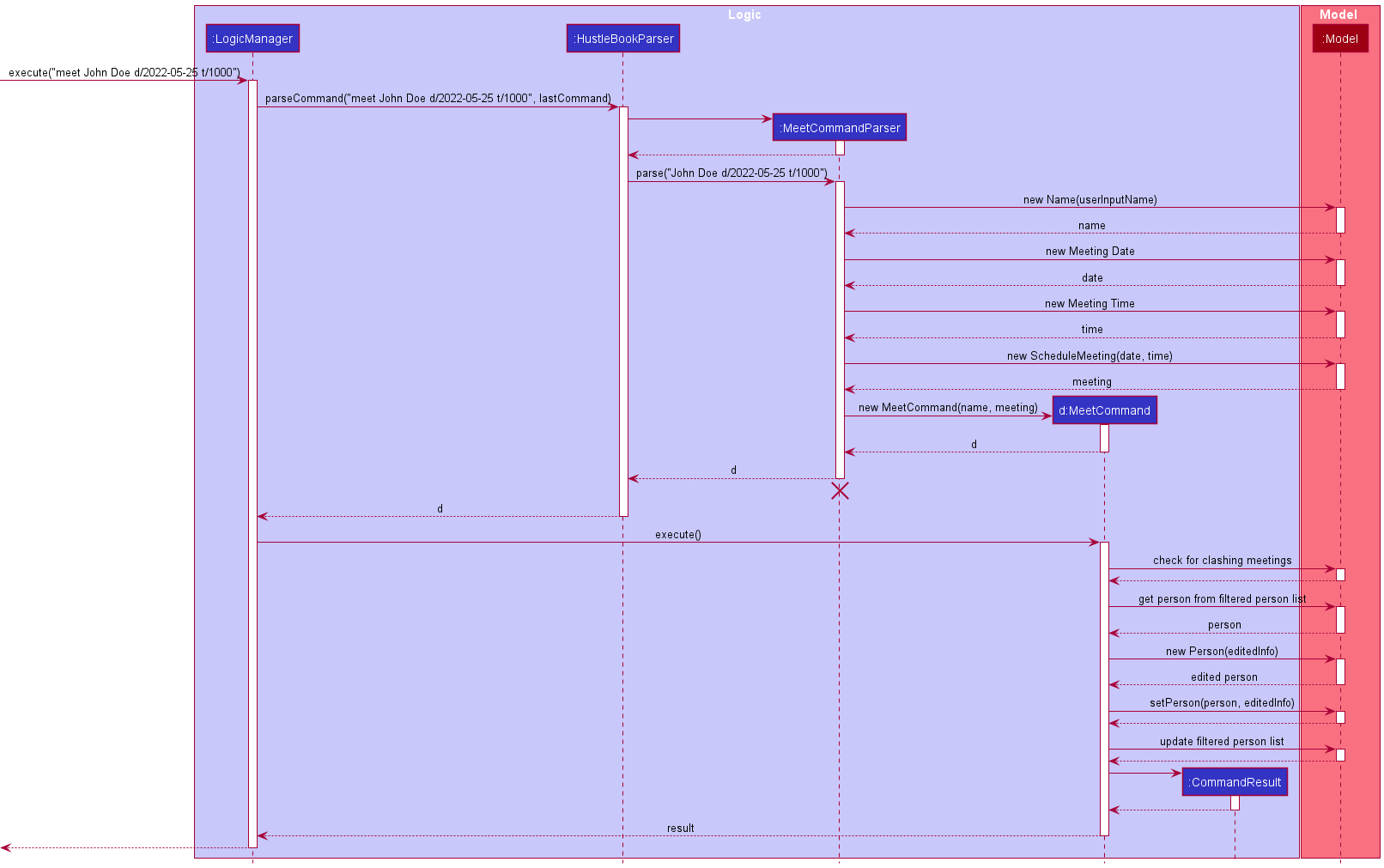
The following sequence diagram shows how the logic of meet command of when meet John Doe d/2022-05-25 t/1000 is executed
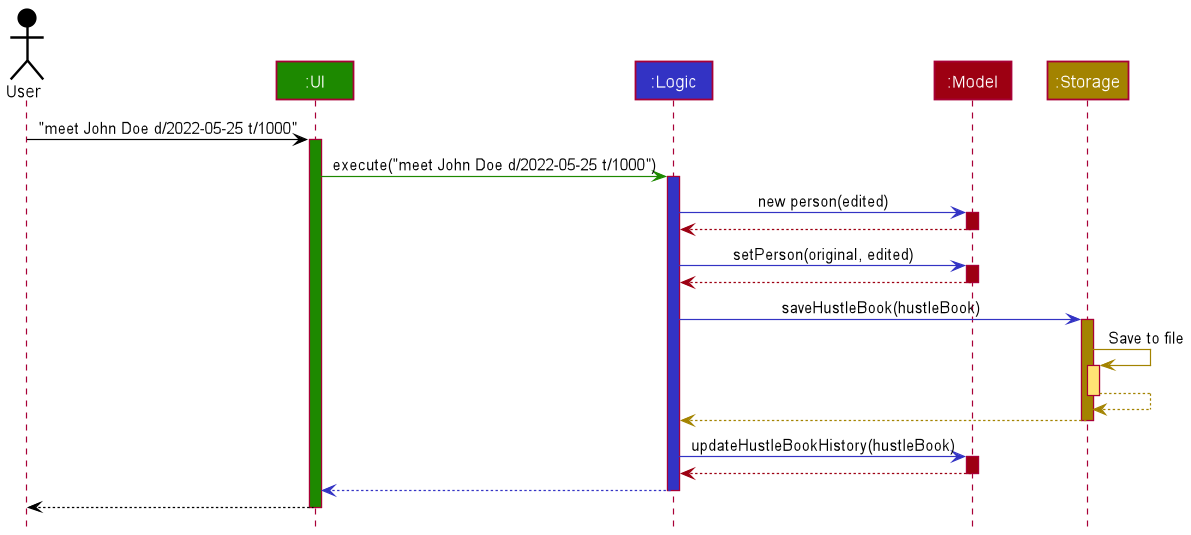
To further understand the internal logic of executing meet John Doe d/2022-05-25 t/1000, a logic sequence diagram is shown
below. This also highlights the logic of checking for meeting clash before scheduling the meeting into HustleBook.
Adding optional attributes
The following attributes are optional, hence, their prefix can be omitted when using add or edit command.
Clients added without the prefixes mentioned below will be assigned a with a predefined value.
This predefined value can be modified using the edit command.
Previous date met
Financial advisors need to keep a close bond with their clients. This mean that they would need to meet up with their clients on a regular basis. It would be beneficial for them to track when was the last time they met with a specific client.
To cater for this information to be stored, an optional attribute PrevDateMet has been implemented. A PrevDateMet stores the
date for each client in YYYY-MM-DD format. The PrevDateMet attribute uses a prefix d/ when using the add or edit command.
Information
Financial advisors would need to keep track of client’s information such as their risk tolerance level, their financial goals and schemes they are currently on.
To cater for this information to be stored, an optional attribute Info has been implemented. A Info stores the information
about the client. The Info attribute uses a prefix i/ when using the add or edit command.
Salary
Clients handled by financial advisors are usually working adults, earning salary and are capable of paying for the services provided by the financial advisors. Moreover, using the client’s salary information, financial advisors can better advise them on the plans and/or services to get. Therefore, it is very beneficial to track clients’ salaries.
To cater for this new information to be stored, a new optional attribute, Salary has been implemented. A Salary exists for each client to store their salary amount.
This attribute can be added to through the use of the s/ prefix. The Salary attribute can be added to a client through the add command as well as modified through the edit command.
Design considerations:
Aspect: Handling default values of PrevDateMet and Info:
-
Alternative 1 (current choice): Non-null values.
- Pros: Less likely to face any errors as no null values are used.
- Cons: Considerations of non-null values as the default value has to make sense for users.
-
Alternative 2: Use null values are default values.
- Pros: Easier and faster to implement.
- Cons: Code wise is more prone to errors and more defensive approach have to be used when handling the new attributes.
Aspect: Handling default values of Salary:
-
Alternative 1 (Current choice): Use a new constructor with no parameters, taking predefined value as salary.
- Pros: Future changes to the predefined value will only need simple and small changes in the constructor.
- Cons: Now the object has an additional constructor method that needs to be kept track of and updated by the developer if any changes are required.
-
Alternative 2: Use the existing constructor with String as a parameter, passing in a predefined value as salary.
- Pros: Through the use of an existing method, a developer needs to keep track of and update only one constructor for that object if any change is required.
- Cons: If any change is required for the predefined value, a developer needs to search all usages of this method and update those using the predefined value to a new value. This can be time-consuming.
Flagging important clients
The feature is implemented to provide functionality and visual representation of important clients. Feature is needed for several user stories involving important clients. A new attribute is thus added to the current Person class. Flag command is created to shorten the process of flagging a client, instead of needing to use the edit command.
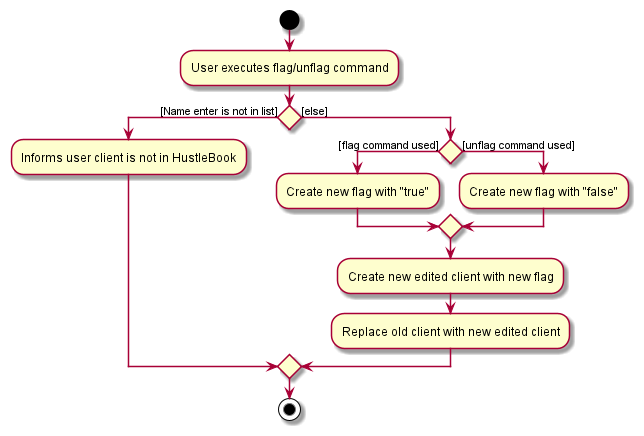
The following activity diagram summarizes how to flag a client.
Additionally, a new prefix, f/, can be used in the add and edit command to specify the flag status directly.
This prefix is optional and can be left out during the creation of a new client contact.
All new clients will adopt a default unflagged state when the flag status is not specified.
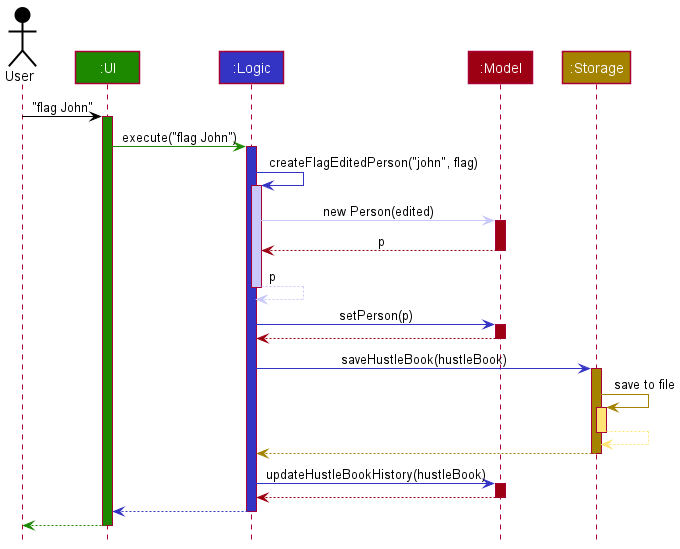
The following sequence diagram shows interactions of each component when the flag/unflag command executes:
Design considerations:
Aspect: Ease of use of flag commands:
-
Alternative 1 (current choice):
flagandunflagsplit into separate commands.- Pros: More intuitive to use as compared to alternative 2 for any user.
- Cons: More commands to test and maintain.
-
Alternative 2: Single
flagcommand and use anf/prefix to set new flag.- Pros: Only one command for both scenarios and fewer tests needed.
- Cons: Usage is not very intuitive to a user.
Edit, Delete, Flag, and Meet Command, Using name
This feature is a more intuitive way for users to perform actions on their clients, as they can simply use the names of their clients to identify them, instead of using their index in the list. There are 2 scenarios that will occur when this feature is used.
Scenario 1 (All names in HustleBook are unique, there no clients with similar names)
The following sequence diagram shows how the logic of running edit/delete/flag/meet NAME [ARGS].
Scenario 2 (There are clients with similar names)
Assume that the user has 3 clients, named John Doe, John Smith and John Willams.
Running edit/delete/flag/meet John [ARGS] will first show a list of clients whose name contains John. In this case,
John Doe, John Smith and John Williams are displayed as a list to the user. The user is then asked to enter the index
of the specific “John” they wish to perform their actions on. If the user gives a valid index (in this case 1, 2 or 3), then the command is executed.
The following diagram illustrates the logic of the command being run.
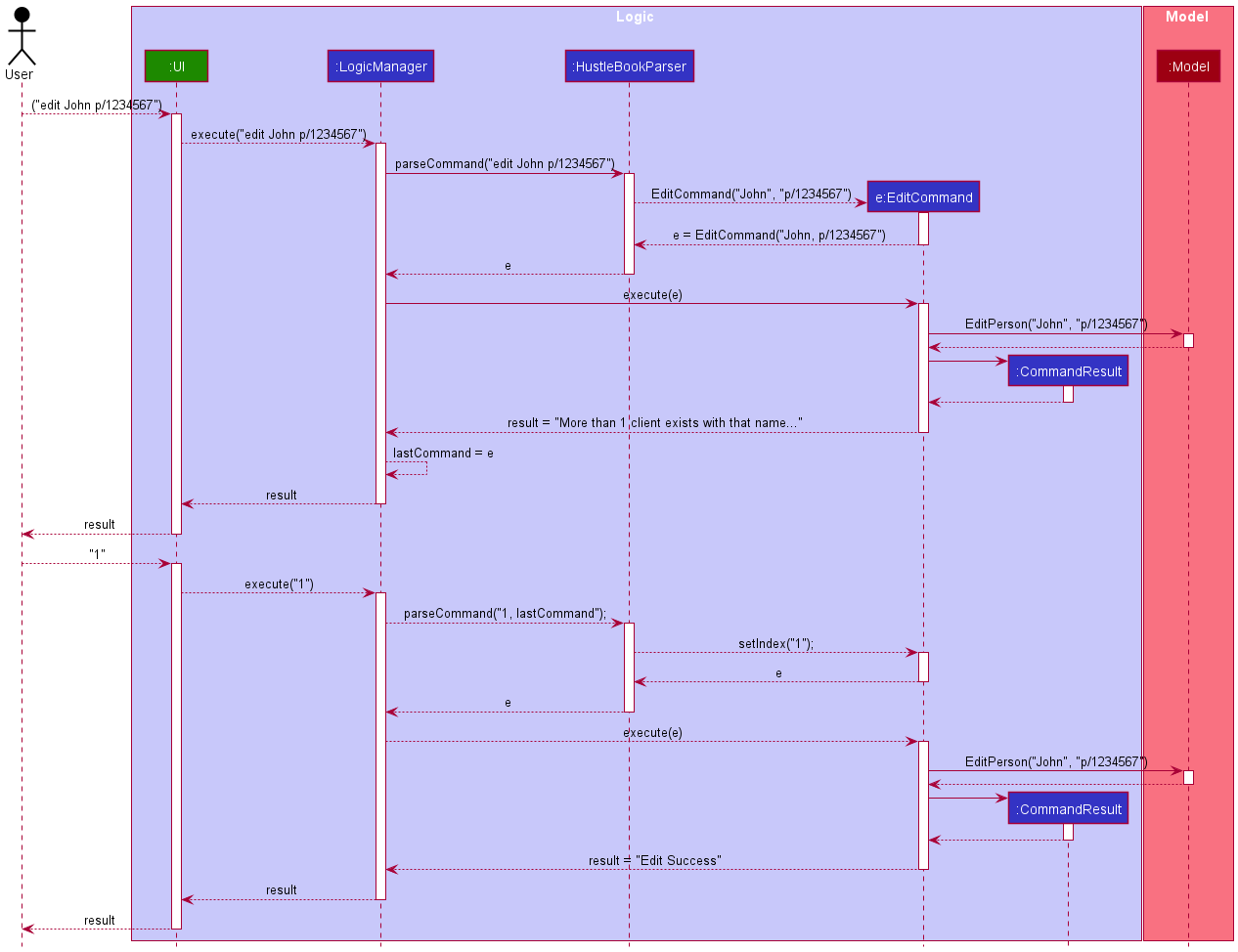
From the diagram, after the first command is executed, the user is informed that there are
multiple clients with name John and is prompted to input an index. After inputting “1”, the function setIndex of EditCommand is called to
specify the client to edit. The EditCommand is then executed normally.
This gives convenience to our users as they would not have to type the full name of the client they want to perform an action on.
Also, when asking the user for multiple inputs, we need a way to keep track of what the user requested beforehand, so they would not need to type it again.
The addition of lastCommand means that the user does not have to type in the command multiple times.
Design considerations:
Aspect: Typing out the full name of a client:
-
Alternative 1 (current choice): User can run a command with only a partial name. If there are multiple users with that name,
the user will be asked a second time to specify which client they are referring to.
- Pros: More convenient for user, user does not have to type out the full name of their client.
- Cons: Logic is more complicated and is more difficult to implement.
-
Alternative 2: User types out the full name of their client.
- Pros: Easier to implement.
- Cons: Inconveniences the user, especially for clients with very long names
List Command
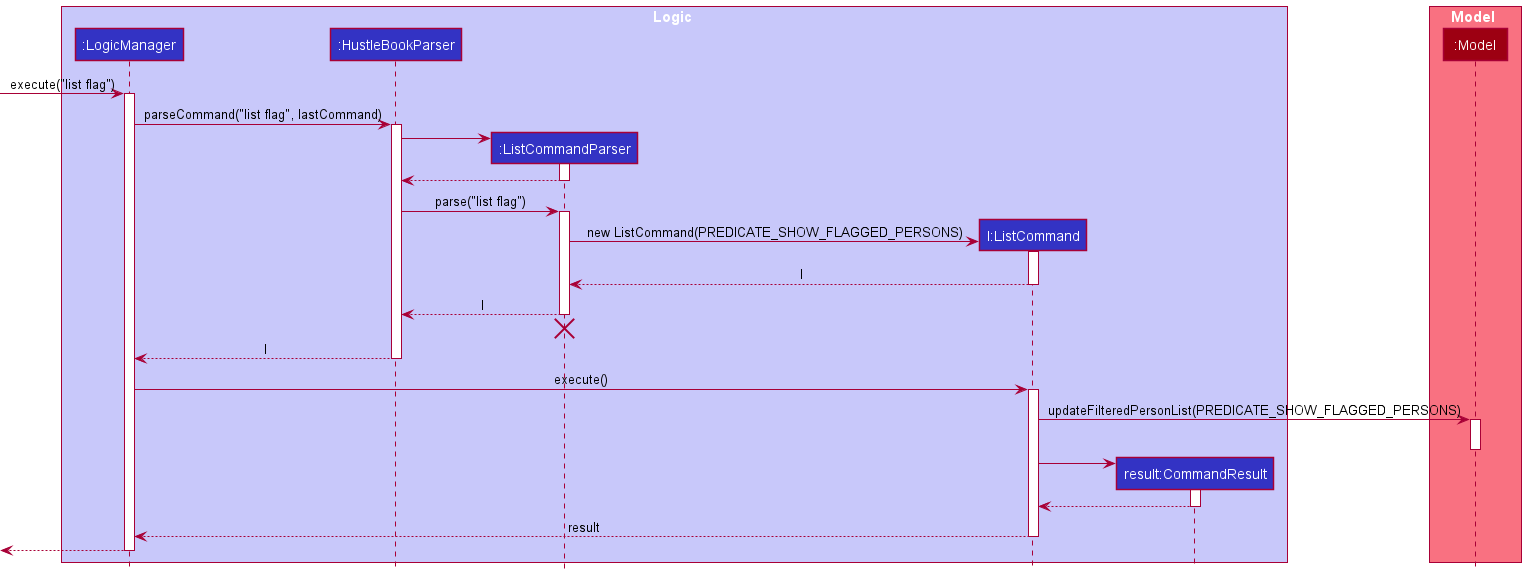
The list command lists all clients in HustleBook and is primarily used after user uses find.
However list has an added functionality of listing only flagged or unflagged clients if the arguments flag or unflag respectively follow the command.
The list mechanism is facilitated by HustleBook. It is implemented by ListCommand that extends Command and parsed
by ListCommandParser. ListCommand utilizes Predicate and model#updateFilteredPersonList.
Below shows the logic sequence diagram of list:
Sort Command
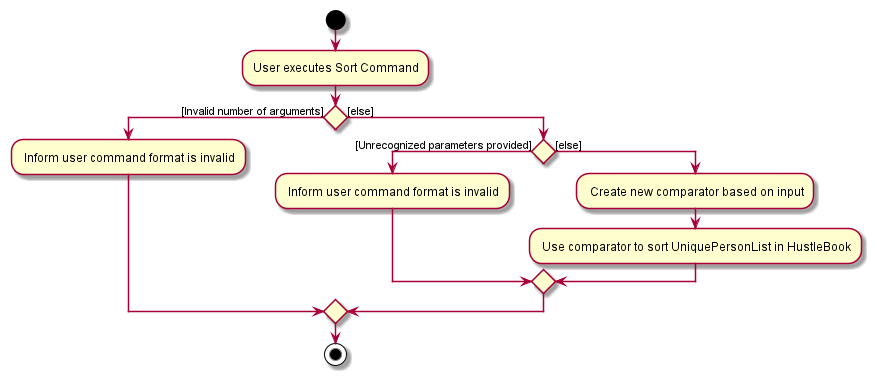
The sort command sorts clients based on the parameter provided by the user input.
The sort mechanism is facilitated by HustleBook. It is implemented by SortCommand that extends Command and parsed
by SortCommandParser. SortCommand accepts a Comparator
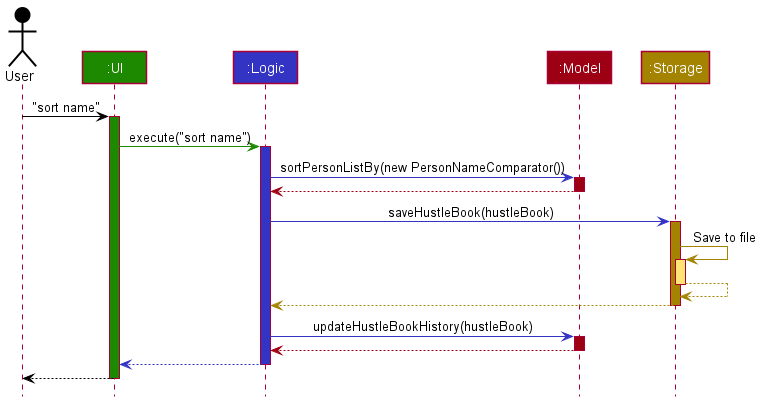
Given below is an example usage scenario and how the sort mechanism behaves at each step.
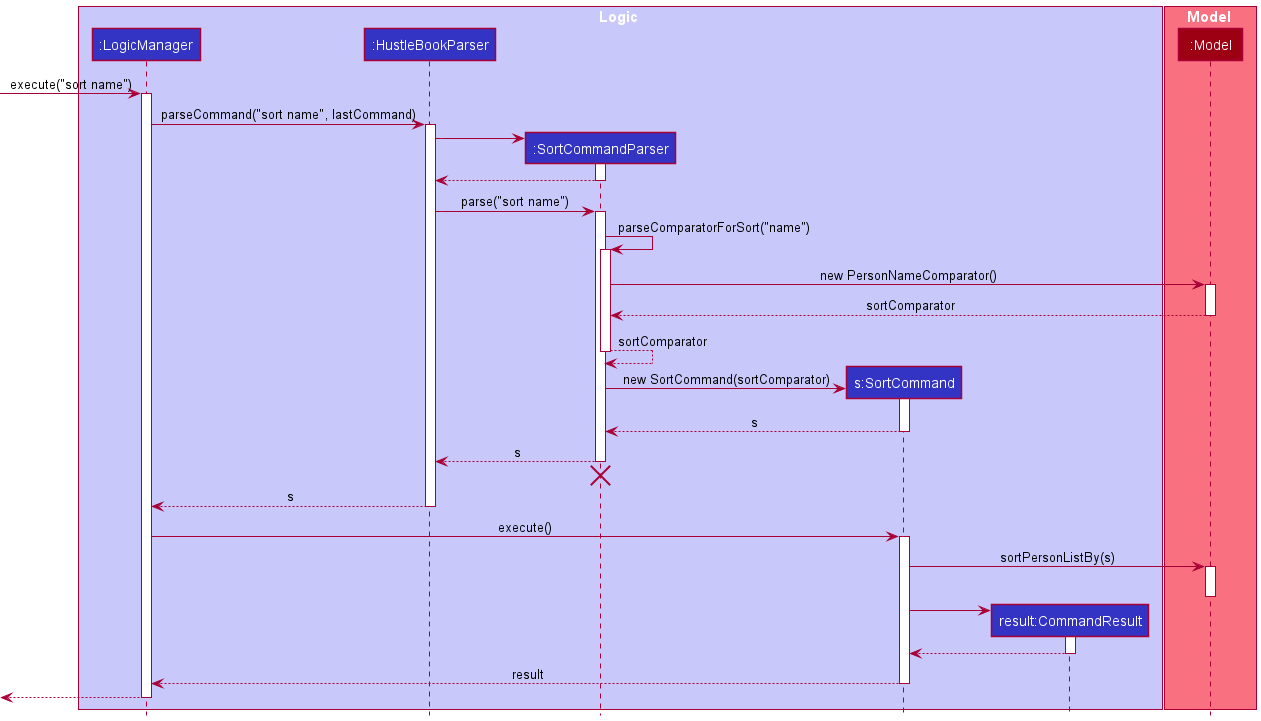
Step 1. The user inputs sort name. LogicManager#excute calls HustleBookParser#parseCommand.
Step 2. HustleBookParser#parseCommand then passes the user input and calls SortComandParser#parse.
Step 3. SortComandParser#parse calls SortCommandParser#parseComparatorForSort to determine the Comparator
required and returns a PersonNameComparator object to SortComandParser#parse.
Step 4. SortComandParser#parse then returns a SortCommand containing PersonNameComparator to LogicManager.
Step 5. LogicManager#execute executes the SortCommand which calls model#sortPersonListBy and sorts the
UniquePersonList using FXCollections.sort and PersonNameComparator.
The following activity diagram summarizes how to sort all clients.
The following sequence diagram shows how the sort command works when executing a command such as sort name:
To further understand the implementation of sort, a logic sequence diagram is provided below. This highlights the use of Comparators in sort:
Undo Command
Background Information
Client’s information is important for a Financial advisor. Therefore, any unintended or accidental changes to the client’s information can cause unnecessary problems. For example, new users can accidentally execute clear, causing them to lose all their client information.
To revert their actions, Financial advisors have to use multiple commands, e.g add, edit etc., together to get back to the original state. This can waste time and resources. Therefore, it is very beneficial to include a undo command to help users undo any unintended or accidental command executions and go back to a previous state.
Class Diagram (Only relevant methods are shown):
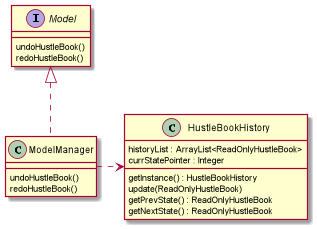
The HustleBookHistory class facilitates the undo command. Throughout the entire programme, there will only be 1 instance of the HustleBookHistory, to ensure proper updating and saving of the history regardless of where it is executed. HustleBookHistory has a historyList and currStatePointer variables stored internally.
These are the operations that aid in undoing the HustleBook to a previous state:
-
HustleBookHistory#getInstance()— Gets the single instance of theHustleBookHistory. -
HustleBookHistory#update(ReadOnlyHustleBook)— Saves the current state of the HustleBook tohistoryList. -
HustleBookHistory#getPrevState()— Returns the previous state of the HustleBook and updates thecurrStatePointerto point to the previous state in thehistoryList.
The Model interface has a Model#undoHustleBook() method which helps to undo the HustleBook to a previous state.
Usage Scenario
This is an example of how the undo mechanism behaves at each step.
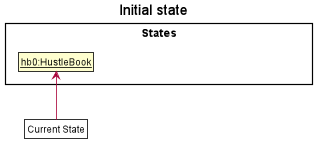
Step 1. The user launches the application for the first time. The HustleBookHistory will be initialized. Through the update command, the initial HustleBook state will be saved to the historyList, and the currentStatePointer will be updated to be pointing to that single HustleBook state.
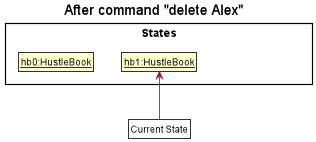
Step 2. The user executes delete Alex command to delete the client named Alex in the HustleBook. The delete command calls LogicManager#execute(), where, after updating the HustleBook storage, the HustleBookHistory#update() command runs. This causes the modified state of the HustleBook after the delete Alex command executes to be saved in the historyList, and the currStatePointer is shifted to point to the newly inserted HustleBook state.
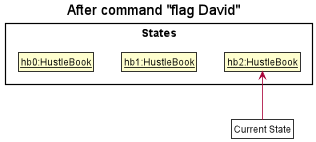
Step 3. The user executes flag David to flag this client David. The flag command also calls LogicManager#execute(), causing another modified HustleBook state to be saved into the historyList, with the currStatePointer updated.
Note: If a command fails its execution, it will not reach the Storage update section in LogicManager#execute() and call HustleBookHistory#update(). As a result, a new HustleBook state is not created. Hence, this HustleBook state will not be saved into the historyList.
Step 4. The user now decides that flagging the client was a mistake, and decides to undo that action by executing the undo command. The undo command will call Model#undoHustleBook(), which will shift the currStatePointer once to the left, pointing it to the previous address book state, and returns this HustleBook state. Through the use of HustleBook#resetData(), which reverts HustleBook back to that state.
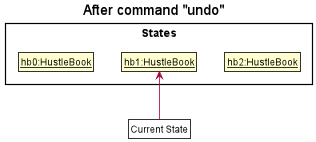
Note: If the currStatePointer is at index 0, pointing to the initial HustleBook state, then there are no previous HustleBook states to restore. The undo command will display a message indicating that there are no commands left to undo instead of trying to get the previous state.
The following sequence diagram shows how the undo operation works:
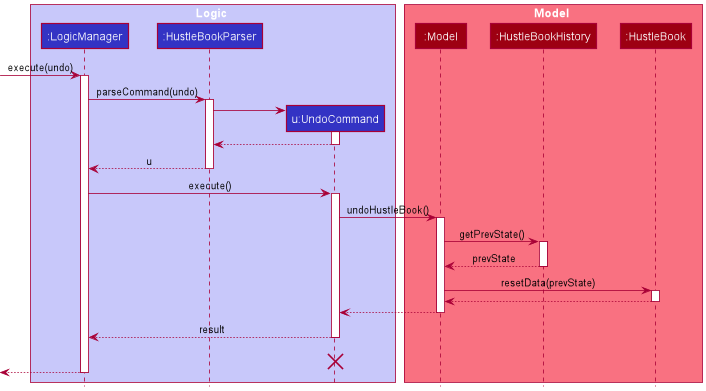
Note: The lifeline for UndoCommand should end at the destroy marker (X) but due to a limitation of PlantUML, the lifeline reaches the end of diagram.
Note: The redo command does the opposite — it calls Model#redoHustleBook(), which shifts the currStatePointer once to the right, pointing to the previously undone state, and restores the HustleBook to that state.
The following activity diagram summarizes what happens when a user executes a new command:
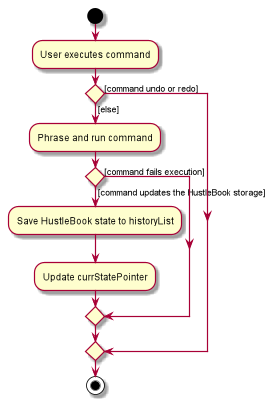
Design considerations:
Aspect: How undo & redo executes:
-
Alternative 1 (current choice): Saves the entire HustleBook.
- Pros: Easy to implement.
- Cons: May have performance issues in terms of memory usage.
-
Alternative 2: Individual command knows how to undo/redo by
itself.
- Pros: Will use less memory (e.g. for
delete, just save the person being deleted). - Cons: We must ensure that the implementation of each individual command are correct.
- Pros: Will use less memory (e.g. for
Documentation, logging, testing, configuration, dev-ops
Appendix: Requirements
Product scope
Target user profile:
- wealth managers managing a significant number of clients
- prefer desktop apps over other types
- can type fast
- prefers typing to mouse interactions
- is reasonably comfortable using CLI apps
Value proposition: keep track and be more organised with their clients
User stories
Priorities: High (must have) - * * *, Medium (nice to have) - * *, Low (unlikely to have) - *
| Priority | As a … | I want to … | So that I can… |
|---|---|---|---|
* * * |
new user | click on the help button for a user guide on how to use the HustleBook | learn on how to use the features in the HustleBook |
* * * |
new user | clear the demo data | start using the HustleBook and enter their own data |
* * * |
new user | view demo data | play around with the features |
* * * |
new user | create new contacts for each new client I get | keep track of my clients |
* * * |
new user | Add relevant information of each client | keep important information regarding each client is captured |
* * * |
new user | find which client they have not met in some time | contact them and get updates |
* * * |
new user | view client details | contact them and get updates |
* * * |
new user | delete a contact | completely delete a contact so it clears up the list |
* * * |
expert user | tag clients for urgent meetings | avoid forgetting important meetings |
* * * |
expert user | edit contact information | update my client’s details |
* * * |
expert user | find a person by name | locate details of persons without having to go through the entire list |
* * |
expert user | archive old contacts | keep the contact list clean and free clutter |
* * |
new user | add a meet up information to a client | track when is the next meet up |
* * |
new user | get tips on existing features | get the required info without referring to help section |
* * |
new user | save a client’s salary information | use this information to provide them better financial advice |
* * |
expert user | load up previous work before shutting | be more efficient |
* * |
expert user | filter important clients | prioritise them |
* * |
expert user | list meet ups for a specific day | view and manage the meet ups with the clients |
* * |
busy user | be alerted when any meeting clashes | make sure my meetings with my clients are scheduled |
* * |
busy user | be reminded if I haven’t met a client in a long time | maintain contact with my clients |
* * |
busy and forgetful User | tag certain clients as priority | be constantly reminded as to not forget them |
* * |
busy user | identify conflicting names by index | perform operations more accurately |
* * |
inattentive user | undo the commands | rectify my mistakes faster and easier |
* * |
inattentive user | redo the commands | recover from undo |
* |
new user | Add social media data for clients | access their social media details |
Use cases
(For all use cases below, the System is the HustleBook and the Actor is the user, unless specified otherwise)
Use case: UC01 - Add a client
MSS
- User requests to add a client.
-
HustleBook adds the client information into the list.
Use case ends.
Extension:
- 1a. HustleBook detects insufficient information.
- 1a1. HustleBook informs user the minimal data needed to add a client.
-
1a2. User enters the correct data.
Steps 1a1-1a2 are repeated until the data entered is sufficient.
Use case resumes at step 2.
- 1b. HustleBook detects incorrect format.
- 1b1. HustleBook informs user the format to follow.
-
1b2. User enters the correct format.
Steps 1b1-1b2 are repeated until a valid format and data is entered.
Use case resumes at step 2.
- 1c. There are multiple clients with the same given name.
- 1c1. HustleBook requests confirmation from the user to add client with same name.
- 1c2. User enters his confirmation.
-
1c3. User accepts to add the client.
Use case resumes at step 2.
- 1d. Same as 1c, except that user rejects to add the client at step 1c3.
- 1d1. HustleBook requests confirmation from the user to add client with same name.
- 1d2. User enters his confirmation.
-
1d3. User rejects to add the client.
Use case ends.
Use case: UC02 - Find Client
MSS
- User requests to find a client.
-
HustleBook shows a client whose name matches the given name.
Use case ends.
Extensions
- 2a. Client list is empty.
-
2a1. HustleBook informs the user that the list is empty.
Use case ends.
-
- 2b. Specified person does not exist on the list.
-
2b1. HustleBook informs the user that the client is not in the list.
Use case ends.
-
- 2c. There are multiple clients with the same given name.
-
2c1. HustleBook shows list of clients whose name matches search term.
Use case ends.
-
Use case: UC03 - Flag a client
MSS
- User requests to list clients.
- HustleBook shows a list of clients.
- User requests to add a flag to a specific client in the list.
- HustleBook adds a flag to the client.
- User requests to list clients again.
-
HustleBook shows flagged client at the top of the list.
Use case ends.
Extensions
- 2a. The list is empty.
-
2a1. HustleBook informs the user that the list is empty.
Use case ends.
-
- 3a. Specified person does not exist on the list.
-
3a1. HustleBook informs the user that the client is not in the list.
Use case resumes at step 2.
-
- 3b. There are multiple clients with the same given name.
- 3b1. HustleBook shows a list of clients that match the specified name.
- 3b2. HustleBook requests for index of the client to update the information to.
-
3b3. User enters an index.
Step 3b2-3b3 is repeated until a valid index is entered.
Use case resumes at step 4.
Use case: UC04 - Edit a client’s information
MSS
- User requests to list clients.
- HustleBook shows a list of clients.
- User requests to edit the information of a specific client in the list.
- HustleBook updates the client’s information with the given information.
-
HustleBook shows the client’s updated information.
Use case ends.
Extensions
- 2a. The list is empty.
-
2a1. HustleBook informs the user that the list is empty.
Use case ends.
-
- 3a. Specified person does not exist on the list.
-
3a1. HustleBook informs the user that the client is not in the list.
Use case resumes at step 2.
-
- 3b. There are multiple clients with the same given name.
- 3b1. HustleBook shows a list of clients with the same given name.
- 3b2. HustleBook requests for index of the client to update the information to.
-
3b3. User enters an index.
Step 3b2-3b3 is repeated until a valid index is entered.
Use case resumes at step 4.
- 3c. HustleBook detects insufficient information.
- 3c1. HustleBook informs user the minimal data needed to add a client.
-
3c2. User enters the correct data.
Steps 3c1-3c2 are repeated until the data entered is sufficient.
Use case resumes at step 2.
- 3d. HustleBook detects incorrect format.
- 3d1. HustleBook informs user the format to follow.
-
3d2. User enters the correct format.
Steps 3d1-3d2 are repeated until a valid format and data is entered.
Use case resumes at step 2.
Use case: UC05 - Delete a person
MSS
- User requests to list persons.
- HustleBook shows a list of persons.
- User requests to delete a specific person in the list.
-
HustleBook deletes the person.
Use case ends.
Extensions
- 2a. The list is empty.
-
2a1. HustleBook informs the user that the list is empty.
Use case ends.
-
- 3a. Specified person does not exist on the list.
-
3a1. HustleBook informs the user that the client is not in the list.
Use case resumes at step 2.
-
- 3b. There are multiple clients with the same given name.
- 3b1. HustleBook shows a list of clients with the same given name.
- 3b2. HustleBook requests for index of the client to delete.
-
3b3. User enters an index.
Step 3b2-3b3 is repeated until a valid index is entered.
Use case resumes at step 4.
Non-Functional Requirements
-
Data requirement:
- HustleBook should be able to handle up to 250 clients.
- Each client’s data should be able to be edited anytime.
-
Constraints:
- A user with above average typing speed for regular English text (i.e. not code, not system admin commands) should be able to accomplish most of the tasks faster using commands than using the mouse.
-
Environment requirements:
- System should work on mainstream OS with java 11 or above installed.
-
Technical requirements:
- System should be able to scale up and handle clients with the same name.
-
Process requirements:
- The project is expected to adhere to a schedule that delivers a feature set every two weeks (v1.2 and v1.3).
-
Notes about project scope:
- The product is not required to handle exporting of data to files for printing or other purposes.
Glossary
- Mainstream OS: Windows, Linux, Unix, OS-X
- HB (HustleBook): The app that is being used to record client details.
- CLI (Command Line Interface): The text box where users can type their inputs and commands.
Appendix: Instructions for manual testing
Given below are instructions to test the app manually.
Note: These instructions only provide a starting point for testers to work on;
testers are expected to do more exploratory testing.
Launch and shutdown
-
Initial launch
-
Download the jar file and copy into an empty folder
-
Double-click the jar file Expected: Shows the GUI with a set of sample contacts. The window size may not be optimum.
-
-
Saving window preferences
-
Resize the window to an optimum size. Move the window to a different location. Close the window.
-
Re-launch the app by double-clicking the jar file.
Expected: The most recent window size and location is retained.
-
Deleting a client
-
Deleting a client while all clients are being shown
-
Prerequisites: List all clients using the
listcommand. Multiple clients in the list from the demo data. -
Test case:
delete Alex
Expected: Client with the nameAlex Yeois deleted from the list. Details of the deleted contact shown in the status message. -
Test case:
delete 123
Expected: No client is deleted as no name is found that contains123from the demo data. Error details shown in the status message. -
Test case:
delete Johnwhen there areJohn DoeandJohn Yeoin the list
Expected: Choose an index of whichJohnshould be deleted. -
Other incorrect delete commands to try:
delete,delete ABC*!@(special characters found)
Expected: Similar to previous.
-